Posts

Showing posts from April, 2013

High-Frequency Realtime with SignalR

Image
High-Frequency Realtime with SignalR Overview Videos Project Wiki Samples Forum Open Source By Patrick Fletcher | April 16, 2013 Tutorial: Getting Started with SignalR (C#) Tutorial: Getting Started with SignalR and MVC 4 (C#) High-Frequency Realtime with SignalR Tutorial: Server Broadcast with ASP.NET SignalR (C#) What is SignalR Transports and Fallbacks Connections and Hubs Supported Platforms This tutorial shows how to create a web application that uses ASP.NET SignalR to provide high-frequency messaging functionality. High-frequency messaging in this case means updates that are sent at a fixed rate; in the case of this application, up to 10 messages a second. The application you'll create in this tutorial displays a shape that users can drag. The position of the shape in all other connected browsers will then be updated to match the position of the dragged shape using timed updates. Concepts introduced in this tutorial have applic...

I am trying to dynamically change the url link of an embeded youtube video from the code-behind on our website.

I am trying to dynamically change the url link of an embeded youtube video from the code-behind on our website. Here is the HTML code for the video: <ajax:TabPanel runat="server" ID="Panel5" HeaderText="Videos">         <ContentTemplate>             <table>                 <tr>                     <td style="width:425px;">                         <object width="425" height="344">                         <param name="movie" value="http://youtube.com/myvideo/" />       ...

Building Your First Web Application Project

Image
Building Your First Web Application Project The below tutorial walks-through how to create, build and run your first web app using C# and the ASP.NET Web Application Project support in VS 2005. Creating a New Project Select File->New Project within the Visual Studio 2005 IDE. This will bring up the New Project dialog. Click on the “Visual C#” node in the tree-view on the left hand side of the dialog box and choose the "ASP.NET Web Application" icon: Choose where you want the project to be created on disk (note that there is no longer a requirement for web projects to be created underneath the inetpub\wwwroot directory -- so you can store the project anywhere on your filesystem). Then name it and hit ok. Visual Studio will then create and open a new web project within the solution explorer. By default it will have a single page (Default.aspx), an AssemblyI...
Image
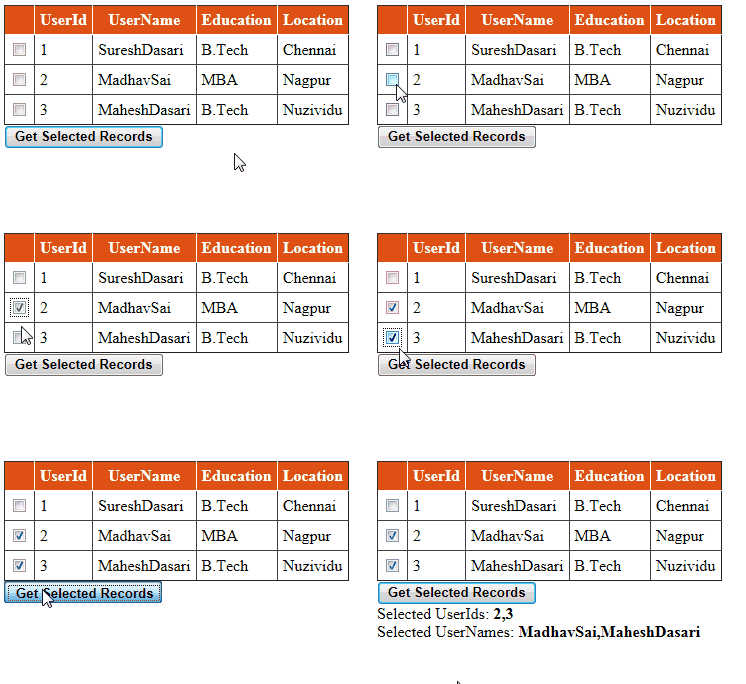
Get Gridview Row Values When Checkbox Selected in Asp.net By: Suresh Dasari Mar 20, 2013 Categories: Asp.net , C#.Net , CheckBox , Gridview , VB.NET Introduction: Here I will explain how to get checkbox selected gridview row values in asp.net using C# and VB.NET or get row values from gridview when checkbox selected in asp.net using C# and VB.NET . Description: In previous articles I explained Asp.net Interview questions , Export Gridview data to PDF , Send values from one page to another page using QueryString , Joins in SQL Server , Highlight Gridview records based on search and many articles relating to Gridview , SQL , jQuery , asp.net , C# , VB.NET . Now I will explain how to get row values from gridview when checkbox selected asp.net using C# and VB.NET . To get checkbox selected row values from gridview we need to write the code like this C# Code foreach ( GridViewRow   gvrow in gvDetails.Rows) ...